Tesla Camp Mode: Controls, Battery Use and Overnight Tips

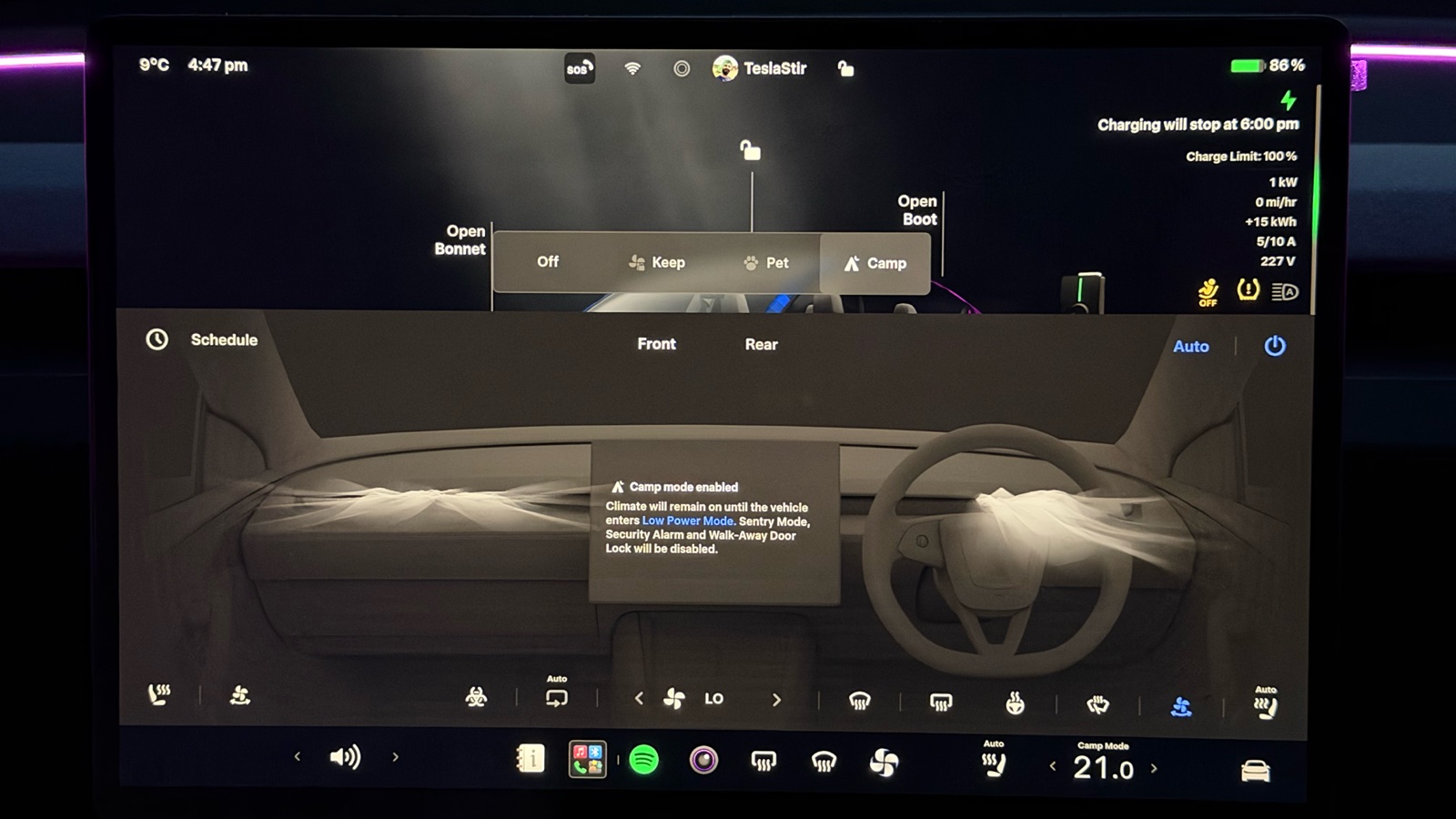
Tesla Camp Mode keeps the climate running and the screen, USB ports and power outlet on while you stay in your parked car, and it turns off Sentry Mode and the alarm. It works the same way on the Model 3, Model Y, Model S, Model X and Cybertruck, and it’s the feature that makes Tesla camping comfortable. The catch: Camp Mode switches off automatic locking and the alarm, so lock the car yourself. And it runs on your battery, so leave enough charge to reach a charger in the morning.
I’m a UK owner with a 2019 Tesla Model 3 Long Range and a Tesla Model Y Long Range (Juniper). I’ve used Camp Mode a few times, mainly to keep the car running with passengers inside when I didn’t want the car or the air con to switch off. For overnight battery use, I’ve gathered figures from owners who have slept in their cars.
This guide covers how to turn it on, how much battery it uses overnight and how to stay safe.
Tesla Camp Mode at a Glance
| What you need to know | Answer |
|---|---|
| Turn it on | In Park, open Climate on the touchscreen and choose Camp, or swipe up on the Climate screen in the Tesla app |
| What stays on | Climate, touchscreen, USB ports and the low-voltage outlet |
| What switches off | Sentry Mode, the alarm, Walk-Away Door Lock and Child Left Alone Detection (on cars that have it), so lock the car yourself |
| What stops it | Shifting out of Park, turning it off, or Low Power Mode (10 to 20%, set by you) |
| Battery per night | About 5 to 15% for a heat pump car in mild or warm weather, and much more in hard frost (owner reports below) |
| Which cars | Model 3, Model Y, Model S, Model X and Cybertruck (Cybertruck isn’t sold in the UK) |
What Stays on While You Are Parked?
Camp Mode keeps the cabin comfortable and the car’s electronics awake, so the Tesla behaves like a small room on wheels. The climate, touchscreen, USB ports and low-voltage outlet stay powered, while security features step aside so your movement inside doesn’t set anything off.
Climate Control
The car holds the cabin at the temperature you choose for as long as Camp Mode stays on. The heating or air conditioning runs from the high-voltage battery, with no engine and no exhaust.
You can adjust the temperature and fan speed from the touchscreen during the night. On a paired phone, the Tesla app lets you change climate settings without sitting up to reach the screen.
Touchscreen and Power Outlets
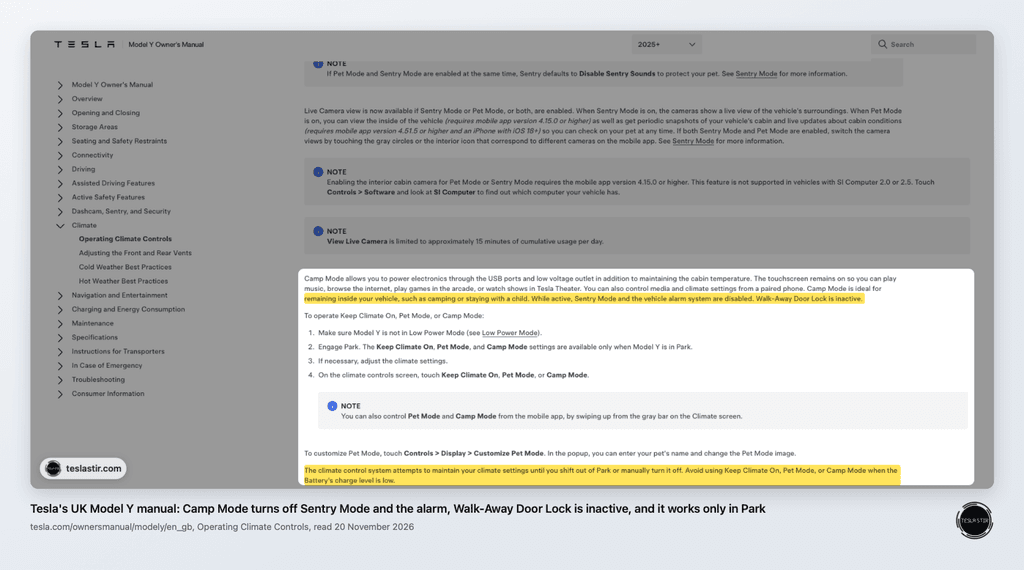
Tesla’s Model Y owner’s manual says Camp Mode powers the USB ports and low-voltage outlet, and keeps the touchscreen on for music, browsing, Arcade and Tesla Theater. Media and climate can also be controlled from a paired phone.
That means you can charge phones, run a small USB light or plug in a fan. Streaming in Tesla Theater needs Wi-Fi or Premium Connectivity.
- UK: Premium Connectivity costs £9.99 a month as of November 2026.
- US: Premium Connectivity costs $9.99 a month or $99 a year, plus tax, as of November 2026. Wi-Fi from a campsite or phone hotspot works as an alternative for streaming.
Camp Mode vs. Keep Climate On and Pet Mode
Tesla offers three parked climate options, and each suits a different job.
| Feature | Camp Mode | Keep Climate On | Pet Mode (Dog Mode on older software) |
|---|---|---|---|
| Who it’s for | People staying inside the car | Keeping the cabin cool or warm while you’re away, such as with shopping in the car on a hot day | Pets left in the car for short periods while you stay nearby |
| Touchscreen | Stays on for music, browsing, Arcade and Tesla Theater | — | Shows the cabin temperature so passers-by know your pet is safe |
| Sentry Mode and alarm | Both turned off, and Walk-Away Door Lock is inactive | — | Sentry Mode can stay on, with Sentry sounds turned off |
Tesla’s current manuals call Dog Mode “Pet Mode”. My detailed Tesla Dog Mode guide covers how it keeps animals safe. For hot days when nobody is inside, Cabin Overheat Protection is the separate feature that limits cabin temperature.
Which Models and Software Versions Support These Features?
Camp Mode arrived in Tesla’s December 2019 holiday software update (2019.40.50), and the current Model 3, Model Y, Model S, Model X and Cybertruck owner’s manuals all describe it the same way. Cybertruck isn’t sold in the UK.
Naming and menu layout shift between software versions, which is why newer software shows Pet Mode and older software still says Dog Mode.
Hardware matters for energy use more than access. Cars with a heat pump heat the cabin more efficiently. Every Model Y has one, and the Model 3 gained one with its refreshed 2021 model in late 2020.
Earlier Model 3 cars use resistive heating. My 2019 Model 3 has no heat pump, while my Model Y Long Range (Juniper) does.
How Do You Turn Tesla Camp Mode On and Off?
You switch Camp Mode on from the climate controls on the touchscreen or in the Tesla app, and the car must be in Park first. It stays on until you turn it off or something forces it off, such as Low Power Mode.
Enable It from the Touchscreen or Tesla App
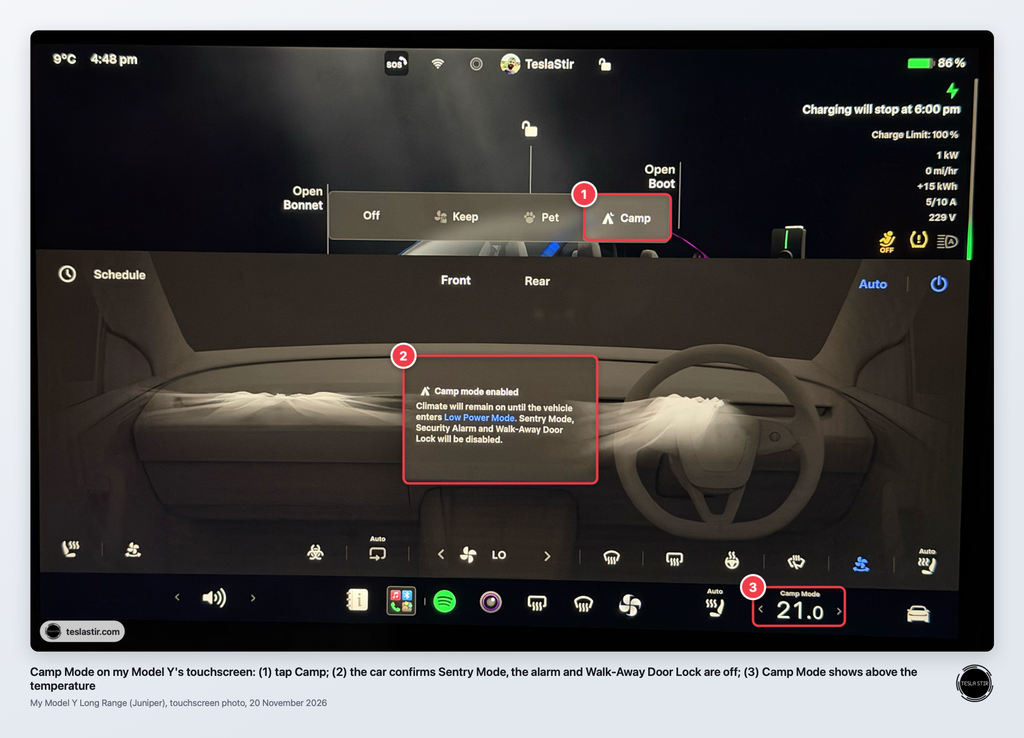
On the touchscreen:
- Shift into Park.
- Tap the temperature on the bottom bar to open Climate.
- Choose Camp from the parked climate options.
In the Tesla app:
- Open the app and tap Climate.
- Swipe up on the Climate screen to show the extra options.
- Tap Camp Mode.
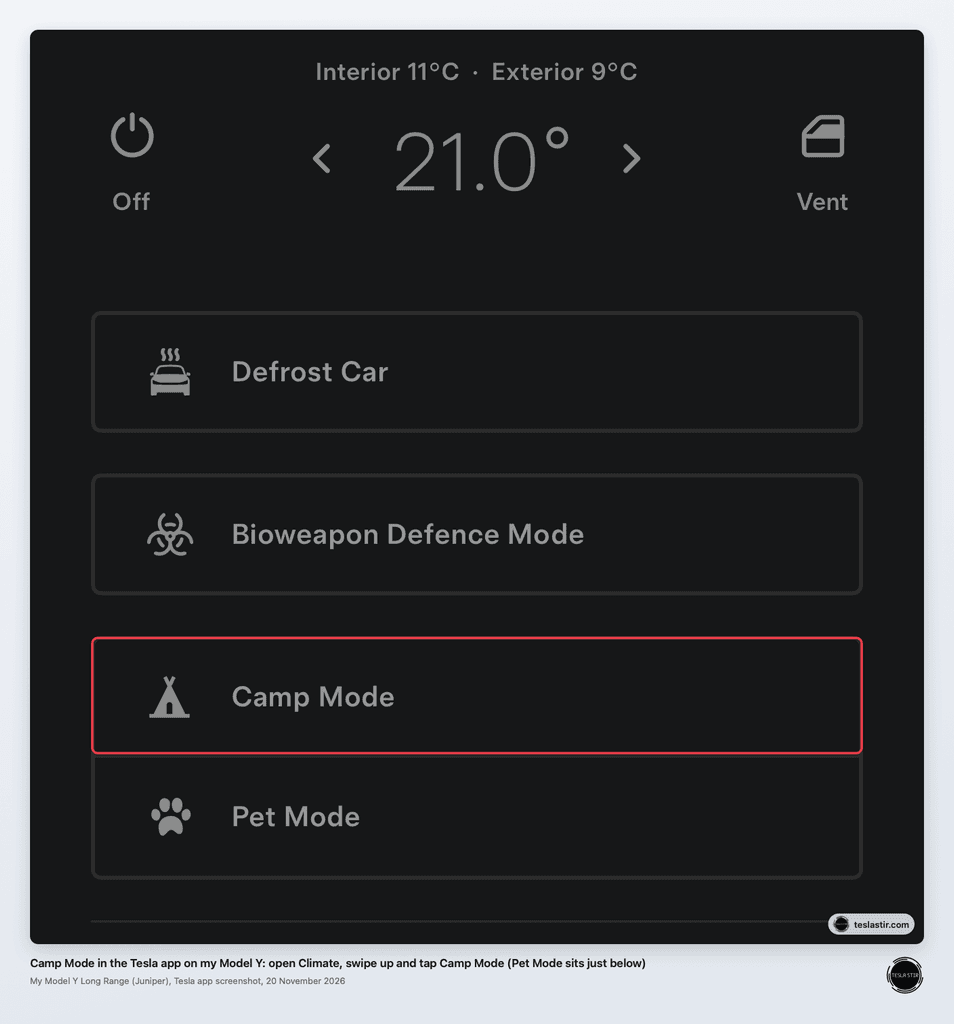
If your screen looks different after an update, search “Camp” in the owner’s manual on the touchscreen.
Set the Temperature and Confirm Camp Mode Is Active
Pick your temperature before you settle down, then check the touchscreen shows Camp Mode as active. A slightly cooler setting in winter and a slightly warmer one in summer both reduce the work the climate system does.
A tip some owners use is a separate driver profile named “Camp”. Save it with the seats pushed forward and “Use Easy Entry” unticked. Tesla’s Model Y manual says Easy Entry moves the driver’s seat and steering wheel when you’re in Park and unbuckle, then moves them back when you press the brake, which you don’t want with a mattress behind the seats.
Switch It off and Troubleshoot Unavailable Controls
Turn Camp Mode off by choosing a different climate option, turning climate off in the app or shifting out of Park. It also stops if the car enters Low Power Mode or finds a climate system fault, and the app sends a notification when the climate turns off.
If you can’t select Camp:
- The car isn’t in Park. Shift into Park and try again.
- Low Power Mode is on. Charge above your threshold, or lower the threshold to 10% under Controls > Charging > Low Power Mode.
- The climate won’t start. My guide to the Tesla “failed to turn on climate” message covers common fixes.
Software updates can’t install while Camp Mode is on, so let any pending update finish before bedtime.
How Much Battery Does Tesla Camp Mode Use Overnight?
Allow for two separate amounts: the energy Camp Mode will use overnight, and a reserve to reach a working charger in the morning. Tesla advises against using Camp Mode when the battery charge is low, and the car enforces that through Low Power Mode.
What Affects Overnight Energy Use?
Camp Mode battery drain changes with the night, so plan around the factors instead of one fixed number:
- Outside temperature. A freezing night or a hot, humid one makes the climate system work hardest.
- Set temperature. The bigger the gap between inside and outside, the more energy you use.
- Cabin size. A Tesla Model Y or Model X has more air to heat or cool than a Model 3.
- Devices plugged in. Laptops, fans and power stations all draw from the battery.
- Heat pump or not. Heat pump cars use less energy to warm the cabin.
The same causes behind why Teslas lose charge while parked apply here, only on a bigger scale. Checking the Energy app before bed shows how your car is doing.
Owners who have measured it give a feel for the range. These are individual readings, not Tesla figures, and night length and settings vary:
| Night | Car | Cabin set to | Battery used | Source |
|---|---|---|---|---|
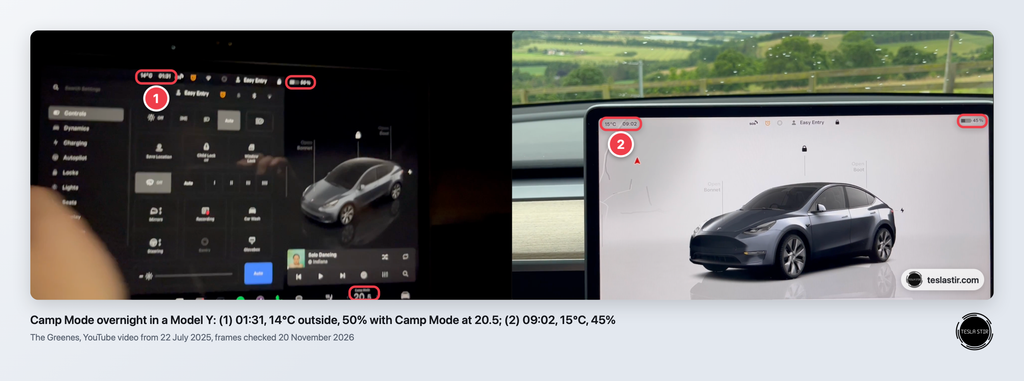
| Mild, about 14 to 15°C outside (Scotland) | Model Y | 20°C | 5% in about 7.5 hours | The Greenes on YouTube, July 2025 (video below) |
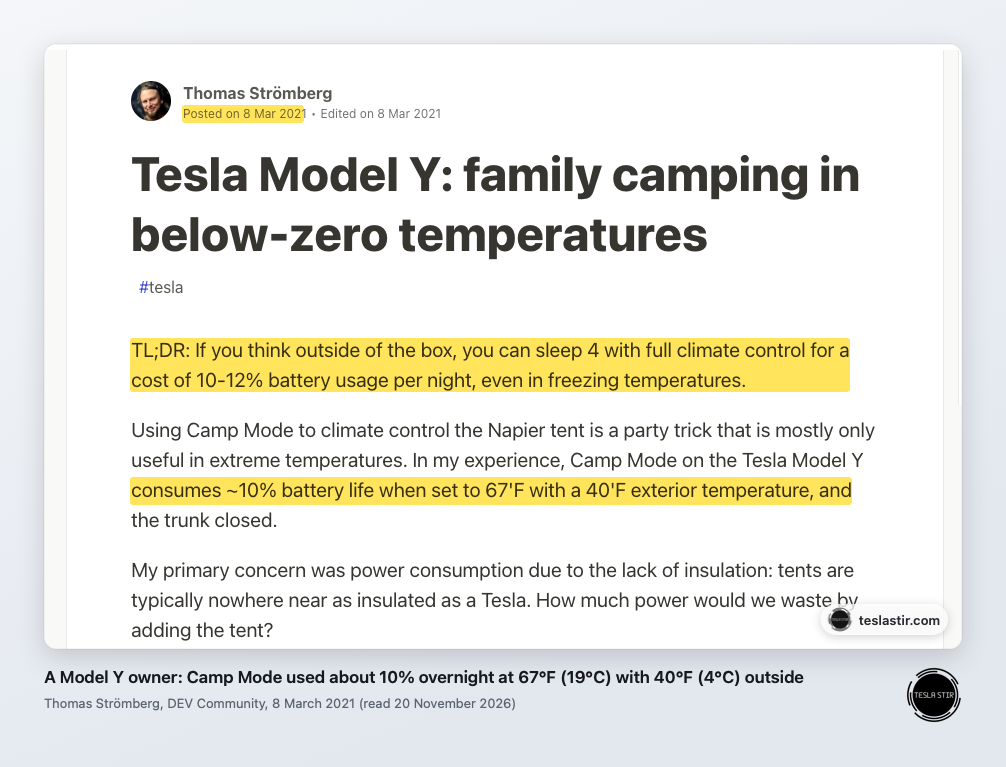
| Cool, about 4°C (40°F) outside | Model Y | About 19°C (67°F) | About 10% overnight | A Model Y owner’s camping write-up, March 2021 |
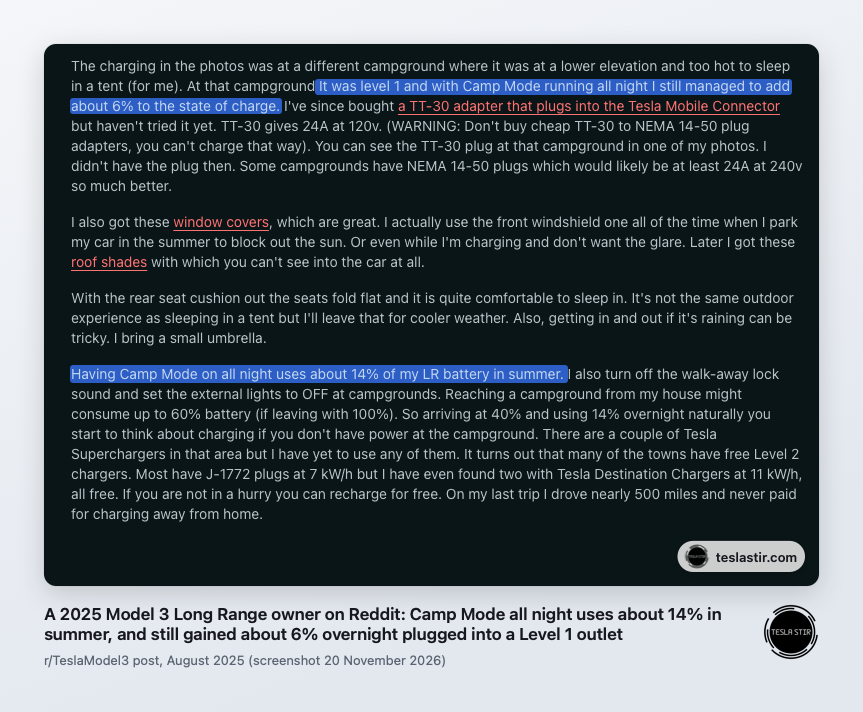
| Hot, humid summer night (US) | 2025 Model 3 Long Range | 19°C (66°F) | About 14% overnight | An owner on Reddit (r/TeslaModel3), August 2025 |
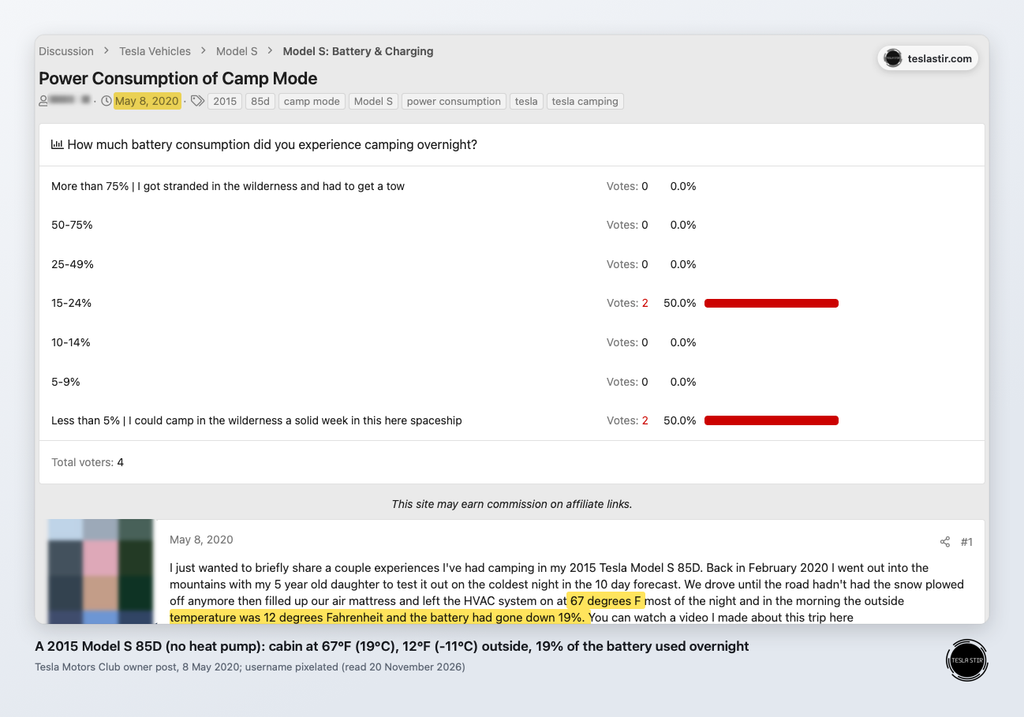
| Freezing, about -11°C (12°F) outside | 2015 Model S 85D, no heat pump | About 19°C (67°F) | 19% overnight | An owner on Tesla Motors Club, May 2020 |
| Extreme cold, -22°C outside (Canada) | Model Y | 20°C | About 28.5 kWh overnight (about 3.8 kWh an hour) | Drive Tesla Canada, February 2021 (the article doesn’t say Camp Mode was used) |
As a rough guide, that’s about 5 to 15% a night for a heat pump car in mild or warm weather, around 20% on a freezing night in an older car without one, and far more in extreme cold, even with a heat pump. The Greenes’ video below shows their mild-night test. It also suggests plugging into a campsite hookup through an extension reel, which Tesla advises against (see the campsite charging section below).
How Low Power Mode Limits Operation
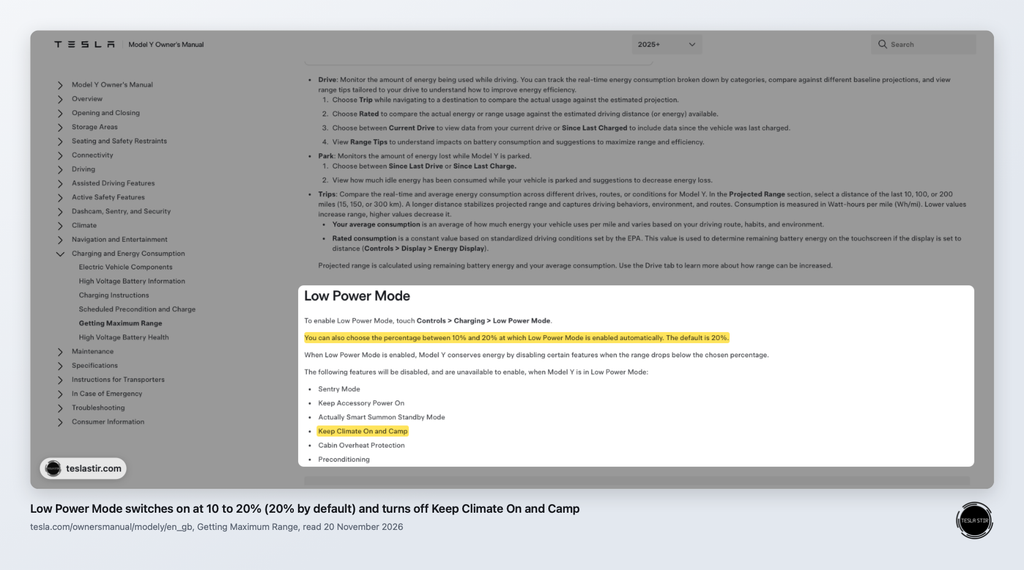
Camp Mode isn’t available in Low Power Mode, and it stops if the car enters it during the night. Tesla’s Model Y manual says Low Power Mode switches on automatically at 20% by default, and you can choose any point between 10% and 20% under Controls > Charging > Low Power Mode.
When that happens, the climate turns off and the app alerts you. On a cold night you’d wake up in a cooling car, so start with enough charge that you stay well above the threshold.
Plan a Separate Reserve for Reaching a Charger
Work out how far the nearest working charger is, and keep enough charge to get there on top of your overnight use. Cold mornings reduce range, and my Tesla range tips cover how weather and driving style affect it.
Before a trip, I usually charge to 90 to 95%, and that habit suits a night in the car too. If you plan to Supercharge in the morning, preconditioning the battery on the way helps it charge faster.
Does an LFP Battery Change Your Planning?
An LFP battery, used in many rear-wheel-drive and Standard versions of the Model 3 and Model Y, works with Camp Mode, but it needs extra care in the cold. LFP packs lose more usable range and charge more slowly when cold than the nickel-based packs in Long Range cars.
Tesla says cars with an LFP battery have different charge limits, so follow the recommended daily and trip limits your car shows under Controls > Charging or in the app. To check your battery type, go to Controls > Software > Additional Vehicle Information: Tesla says the battery type only shows there if it’s LFP. Both my cars are Long Range, so I have no LFP experience of my own.
How Do You Stay Secure and Safe While Sleeping?
Lock the car yourself, keep an exit clear and never bring fuel-burning equipment inside. Camp Mode turns off several protections you rely on day to day, so a quick routine before sleep fills the gap.
Lock Manually: Sentry Mode, the Alarm and Walk-Away Locking Are Inactive
While Camp Mode is active, Sentry Mode and the alarm are disabled and Walk-Away Door Lock doesn’t operate. That means your movement inside won’t set anything off, but the car also won’t lock itself the way it normally does.
That matters even if you’re not camping. When I’ve used Camp Mode to keep the car running for passengers, the point is that the car stays on. But it also won’t lock itself as you walk away, so lock it from the app when you step away, with or without passengers inside. Tesla’s manual says locking the doors from the touchscreen stops the doors being opened from the outside, while anyone inside can still open a door with the button on the door handle. Never leave a child in the car on their own.
I keep Sentry Mode on every time I park away from home, so this is the habit change to remember. Lock from the touchscreen or the app before sleeping, and keep a key card handy as a backup in case your phone battery dies.
Keep Exits Clear and Never Leave a Child Unattended
Keep at least one door free of bedding, bags and folded seats so you can get out fast. Know where the manual door release is in your model, because Tesla says the door buttons won’t work if the car loses low-voltage power.
Tesla says Camp Mode suits staying inside the car, including staying with a child, but it’s not for leaving anyone in the car alone. Tesla’s manual warns: never leave a child unattended in your vehicle.
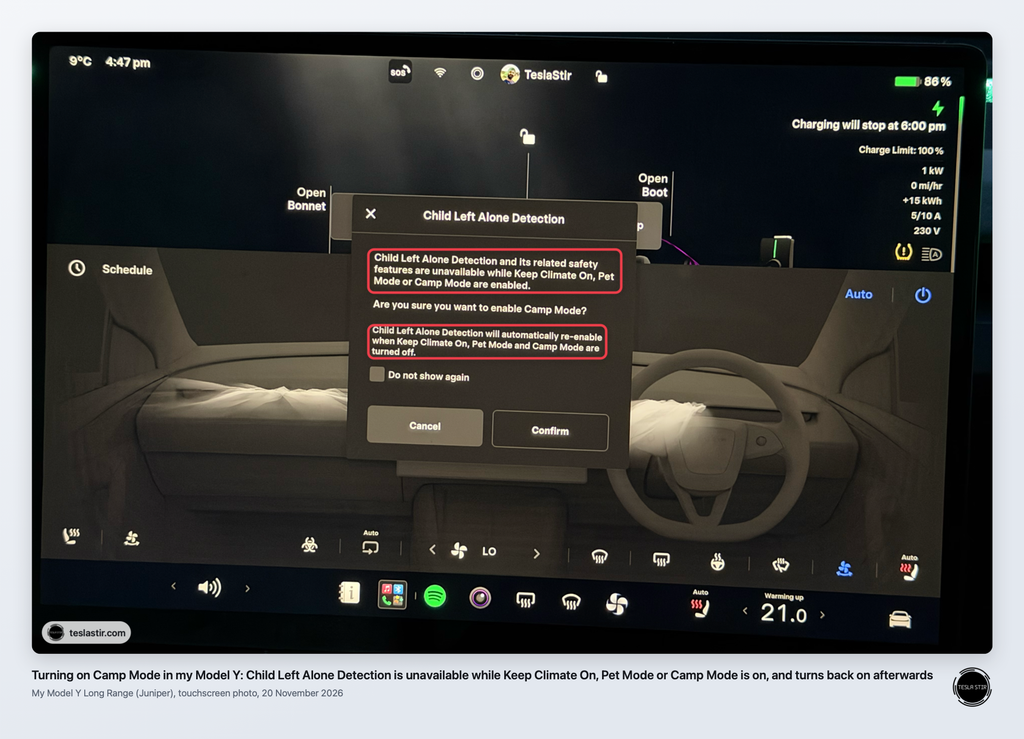
When I switched Camp Mode on in my Model Y, the screen warned that Child Left Alone Detection and its related safety features are unavailable while Keep Climate On, Pet Mode or Camp Mode is on. They switch back on automatically once you turn those modes off.
Understand Ventilation, Climate Alerts and System Limitations
The car makes no exhaust, but stoves, heaters and charcoal do. A 1999 CDC report on camping deaths says fuel-burning equipment such as camping stoves, heaters and charcoal grills should never be used inside a tent, camper or other enclosed shelter, and that opening doors or windows isn’t enough to stop carbon monoxide building up.
For fresh air, set the air intake to outside air in the climate menu. Keep your phone charged and notifications on, so you’ll see the app alert if the climate shuts off.
How Do You Stop the Windows Fogging Up?
A fogged windscreen in the morning is a familiar problem when you sleep in a car, because you breathe moisture into a small space all night. Keep Camp Mode running with the air intake on outside air rather than recirculate, crack a window slightly on mild nights, and keep wet coats, towels and shoes out of the cabin. The Greenes woke to no condensation on the glass after a rainy night with Camp Mode on.
Tesla Camping: Plan Your Parking, Sleeping Setup and Charging
Good Tesla camping starts with a legal, level spot and a plan for charging. Bedding and a few small items make the night comfortable.
Check Overnight Parking Permission and Local Rules
Use a campsite or a place that clearly allows people to sleep in vehicles overnight. Rules differ by country, region and landowner.
- UK: Check with the landowner, campsite or local council before staying overnight anywhere outside a campsite. Don’t plan to sleep in the car after drinking: GOV.UK lists being in charge of a vehicle while above the legal limit as an offence, with up to 3 months’ imprisonment, a fine of up to £2,500 and a possible driving ban, and you don’t have to be driving to be in charge of a car.
- US: Check the rules of the land manager, park, campground or private business before you settle in.
Signs at car parks and rest areas also matter, so read them before unpacking.
Best Apps for Tesla Camping
A few apps make it easier to find somewhere to stay and somewhere to charge:
- Tesla app: turn Camp Mode on, change the temperature and lock the car without getting up.
- Park4Night: overnight spots and campsites, rated by other users.
- iOverlander: a similar map of places to stay, widely used in North America.
- PlugShare: chargers worldwide, with reviews from other drivers.
- Zapmap: the UK’s charge point map.
- Chargemap: charge points across Europe.
- A Better Route Planner: plans charging stops for your route.
For more, see my guide to the best Tesla apps.
Prepare Bedding, Privacy Covers and Practical Essentials
Fold the rear seats, push the front seats forward and lay down a mattress or thick pad. A Tesla Model Y gives more flat length than a Model 3, which suits taller sleepers.
Useful items include:
- A mattress or foam pad made to fit the boot floor
- Sleeping bag or duvet and pillows
- Window shades for privacy and light, plus a glass-roof sunshade (Tesla and other brands sell them), because the roof heats the cabin fast in morning sun. Leave it off after dark if you’d like to see the stars.
- USB cables and a small battery lantern
- Your key card
Decide where everything goes before you make the bed, so you don’t block the exit later.
Use the frunk for food, wet coats and shoes, and anything that smells, so the sleeping space stays dry and clean. In a Model 3 or Model Y, the storage space under the boot floor is a good place for bedding while you drive.
Before bed, set the dome lights to Off under Controls > Lights. On Auto, Tesla’s manual says they come on when you open a door to get out, which is the last thing you want on a 3am toilet trip. Turn the accent lights off there too if your car has them. If another light still bothers you, a small piece of tape over it does the job.
Arrange Campsite Charging or a Morning Charging Stop
A campsite with an EV hookup is the easiest option, because the car tops up while you sleep. Ask the site first what socket it has and whether you can charge a car from it. Use Tesla’s own adapter for that socket, never an extension reel, because Tesla’s Mobile Connector manual says not to use an extension cord. Tesla Destination Charging at hotels and holiday parks is another choice, and some host businesses add fees or limits.
Without a hookup, plan a Supercharger stop for the morning, but don’t sleep at a Supercharger. When a site is busy, Tesla charges a congestion fee once you reach 80% or finish charging, after a five-minute grace period: up to £0.50 a minute in the UK, and typically $0.50 (up to $1.00) a minute in the US (Tesla UK and Tesla US, checked November 2026). Charge, then move somewhere meant for overnight stays.
Plug and Charge at Superchargers is one of my favourite features, and if a bay fails, try another before assuming a bigger fault.
Allow Extra Reserves for Dispersed Camping and Boondocking
Dispersed camping and boondocking (US terms for camping away from facilities, often on public land) put you far from chargers. Long gravel tracks, hills and cold mornings all use more energy than the map suggests.
Add a bigger buffer than you’d use at a campsite, and work out the route to the nearest charger before you go. If the forecast turns colder than expected, start with more charge or pick a site with hookup.
Set Up Comfortably and Keep a Charging Reserve
Tesla Camp Mode turns your parked car into a warm or cool place to sleep, with the screen and outlets on. It needs Park, a healthy battery and a few habits from you.
Before bed, run through this short checklist:
- Charge high before the trip. I usually charge to 90 to 95% before a trip, and LFP cars should follow the limits the car recommends.
- Confirm Camp Mode shows as active and the temperature suits the forecast.
- Lock the doors manually and keep your key card nearby.
- Leave one exit clear and set the air intake to outside air.
- Keep fuel-burning stoves and heaters outside the car.
- Know the distance to your morning charger and keep that reserve untouched.
If the app warns you that the climate has turned off, check your battery level first, since Low Power Mode is the most likely cause.
Frequently Asked Questions
Can I turn off the screen while Camp Mode stays on?
Tesla’s manual doesn’t list a way to switch the screen off in Camp Mode, because keeping it on is part of the feature. You can turn the brightness down under Controls > Display.
Can I use Camp Mode while charging?
Yes. Plugging in at a campsite hookup or destination charger offsets the climate’s energy use, so you lose less charge overnight or even gain some. The same 2025 Model 3 owner said on Reddit that they still gained about 6% overnight with Camp Mode on, plugged into a standard US 120 V (Level 1) outlet. Check with the site before you plug in.
How long can a Tesla stay in Camp Mode?
Tesla’s manual gives no time limit. Camp Mode runs until you turn it off, shift out of Park or the car enters Low Power Mode. How long that takes depends on your starting charge and the Camp Mode battery drain from weather, settings and plugged-in devices.
Does Camp Mode prevent CO2 build-up?
Tesla doesn’t say Camp Mode manages carbon dioxide, so set the air intake to outside air rather than recirculate for fresh airflow. The car makes no carbon monoxide itself, but never run stoves or heaters inside.
Do I need Premium Connectivity to use Camp Mode?
No. Camp Mode and its app controls work without Premium Connectivity, which only matters for streaming over mobile data. It costs £9.99 a month in the UK, and $9.99 a month or $99 a year plus tax in the US (November 2026).