
Tesla Brent Cross Collection Point: A UK Collection Guide

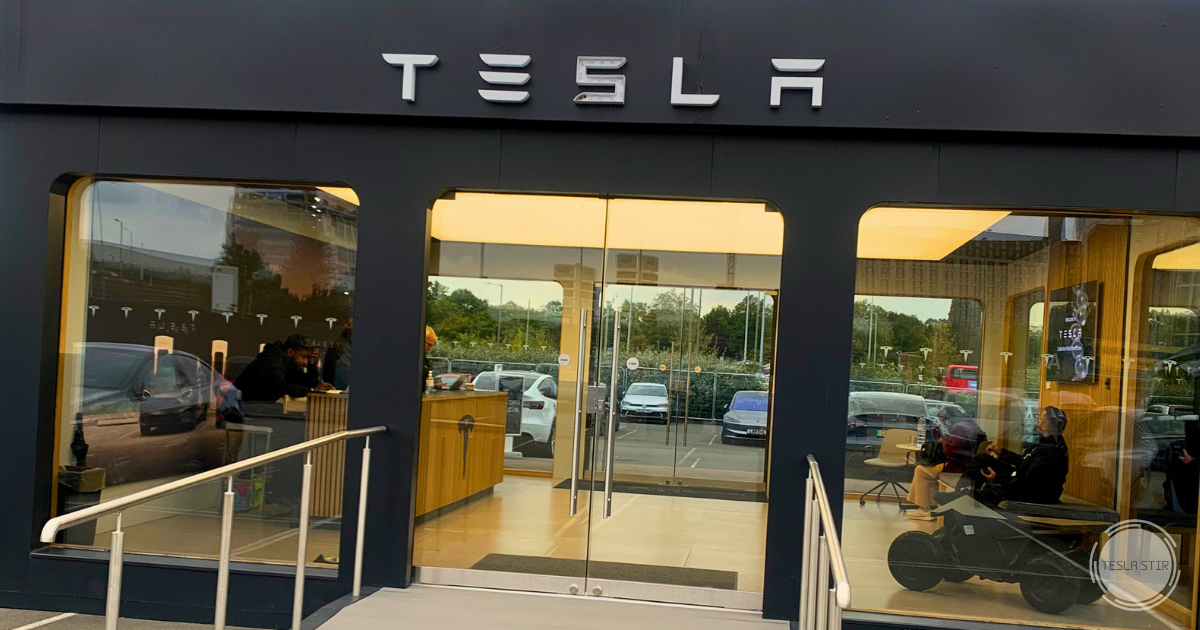
The Brent Cross postcode covers a huge shopping centre site, so it’s easy to end up in the wrong place when collecting a new Tesla. I collected my Model Y Long Range here in September 2025, and this is what I’d tell anyone going there.
Tesla’s Brent Cross collection point is in a car park off Stadium Road East, just off the A406 and separate from the main shopping centre buildings. Tesla lists the address as Prince Charles Drive, NW4 3FP, open 10am to 5pm Monday to Saturday and closed on Sundays. Collection is by appointment, so check your time in the Tesla app before travelling.
Key Takeaways
- The collection point is in a car park off Stadium Road East, near the A406, not at the main shopping centre.
- Collection is by appointment only, and Tesla lists the site as open 10am to 5pm, Monday to Saturday. Your appointment details are in the Tesla app.
- Inspect the car before you start the Accept step, and photograph and log any issues with the attendant.
- The car may not have much charge, so check the level and plan any charging before you leave.
Where Should You Go for Your Collection Appointment?
Tesla assigns your collection centre when it schedules your delivery, and it is not always the site nearest home. My Model 3 came from West Drayton in 2019, a short drive from where I live. By the time I got my Model Y, West Drayton was no longer used for deliveries, so I had to collect from Brent Cross, which was quite a drive. Check the location shown in your order before making travel plans.
The Tesla app shows the full address and your appointment time in the Schedule step of your order, and there is another Appointment Details link on the final Accept screen.
As of November 2026, Tesla’s page for the site lists it as a new vehicle collection point with the hours above. The shopping centre’s directory shows the same hours and lists the phone number 01628 450660.
How to Reach the Collection Point by Car
Do not drive to the main shopping centre. This map pin marks the exact location. Look for a small black Tesla-branded reception building in the car park. Street View may not show it yet.
- Leave the A406 North Circular for Stadium Road East. Coming from the south-west, my route was the A40 to Hanger Lane Gyratory, the A406 eastbound, then the Staples Corner junctions. Follow your sat nav to the map pin from other directions.
- Watch for the Tesla signs as you come off the A406. Tesla has enough signage here that you should not miss it.
- Do not continue along Stadium Road East towards the shopping centre.
- Make the U-turn at the roundabout and come back to enter the car park.
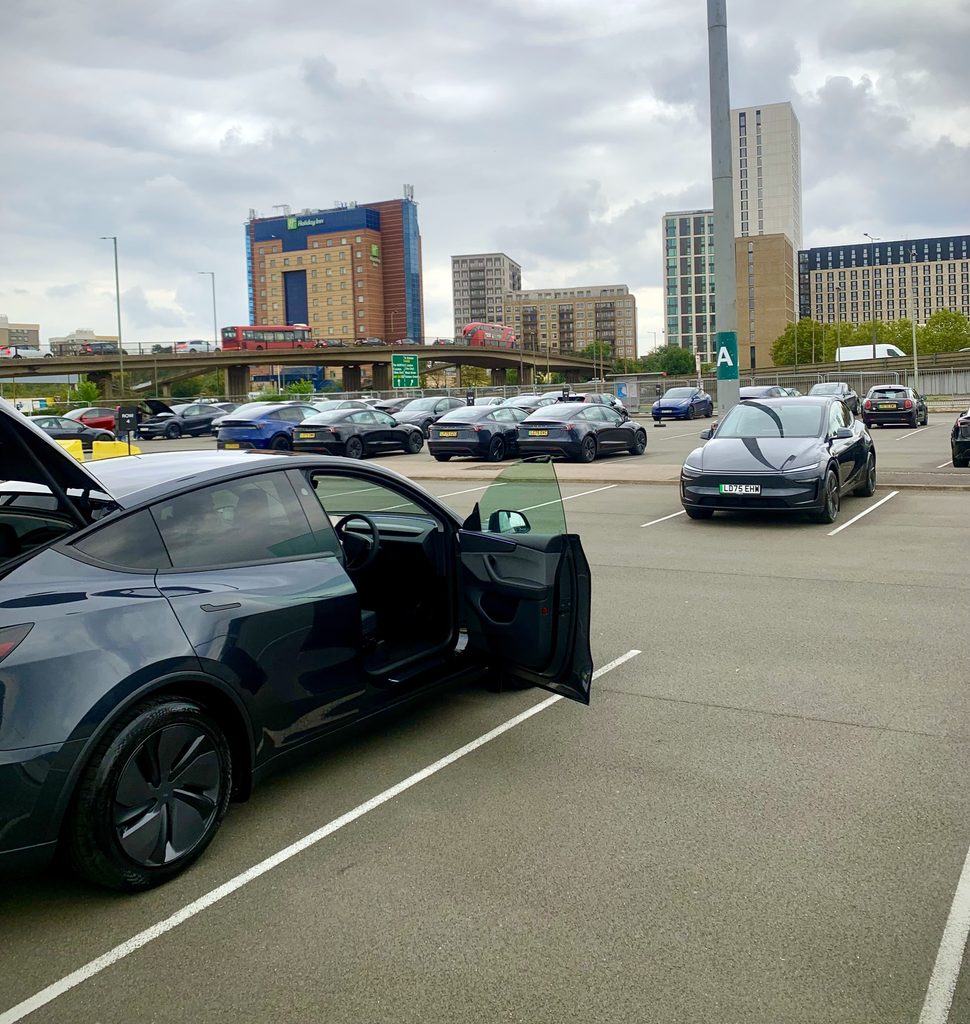
The car park around the reception building is large, so anyone driving you can leave their car there. If you are part-exchanging a car, check the instructions in your app for where to leave it.
Arriving by Uber, Tube or Bus
I took an Uber, and it dropped us in the car park at the map pin, which was the easiest option.
- Tube: Brent Cross station on the Northern line is about 0.8 miles away. Google Maps shows an 18-minute walk, though around 15 minutes is realistic.
- Bus: the Brent Cross Shopping Centre bus station serves routes including 112, 142, 182, 232, 266 and 326. From the shopping centre, the collection point is about 0.3 miles away, or around a 7-minute walk.
Check your route to the map pin in a journey planner before setting off.
The Supercharger and Demo Drives Are Separate
The Brent Cross Supercharger is in the shopping centre car park on Level 2, not at the collection point. Demo drives are a separate booking. Tesla’s page for this site lets you schedule one, and there are several ways to test drive a Tesla before you order.
What Should You Prepare and Bring?
Most of the preparation happens in the Tesla app before you leave home.
Complete the Tasks Shown in Your Tesla App
My Tesla app listed seven steps, which I completed as early as I could. They may change, but this is what they were on my order:
- Delivery details: confirm your details.
- Trade-in: add your part-exchange, or select no trade-in as I did.
- Financing: sort this upfront if you are financing.
- Registration: add details here if you are transferring a registration plate you already own.
- Schedule: once Tesla notifies you, pick your appointment and check the collection point details. This is where the full Brent Cross address appeared for me.
- Final payment: review your remaining balance and how it is being paid.
- Accept: this became available on collection day, with a Start button and another link to your appointment details. It is where you sign the digital paperwork and formally take delivery.
Having the earlier steps done meant the handover could focus on the car. Make sure your phone is charged and the Tesla app is logged in to the account linked to the order.
Confirm Required Documents and Any Part-Exchange Instructions
Tesla tells you which documents to bring in the app and your confirmation messages. Bring your driving licence, as mine was checked at collection.
Insurance needs to be in place from the moment you drive away. I had my policy set up in advance, then activated it a day before so it started from midnight on collection day.
If you are part-exchanging a car, follow Tesla’s separate instructions for it. These can cover paperwork, keys and where to leave the old car. Clear out the old car fully before setting off, including the glovebox, door pockets and boot.
Optional Items That Make Collection Easier
These are my own suggestions and not Tesla requirements:
- A phone charger or cable for the drive home
- A small torch for checking lower bodywork and wheels in poor light
- A second person, who can watch your belongings and help check the car
What Happens at Handover, and What Should You Check?
Handover comes down to checking in, inspecting the car and accepting it in the app.
My September 2025 Collection Experience
This is one visit, and the setup might look different when you arrive.
The reception is a small black Tesla-branded building in the car park, with a ramp up to glass doors and a desk and some seating inside.
We reported to the desk, and the attendant told us where the car was, in the far corner of the car park. I did my first inspection there.
Later, as spaces cleared, I requested the staff to move the car to a spot opposite the reception building. The attendant then went through my list of issues and helped log them in the app, and I signed and accepted the car in the final app step.
The process took around 30 to 40 minutes, although we stayed a little longer to take photos of the car and of the issues I had reported, which you need to attach to the service request anyway.
The issues I found were mostly small:
- Panel alignment: Tesla reviewed these and most came back as within its allowance.
- Dirt marks on the white seats: these were cleaned and came off straight away.
- Glue marks on the outside: these were cleaned at a later appointment.
- Bubbles in the paint protection film on one door: this was sorted at a service visit.
Finish Your Inspection Before You Accept
Finish your inspection before you start the Accept step. This is your chance to raise anything, and if the car is not to your specification or has a major problem, you can decline to accept it. Issues are easier to deal with at this stage.
Tesla’s warranty and your UK consumer rights still apply afterwards.
A Practical Exterior, Interior and Function Check
Work round the car in the same order every time so nothing gets missed.
Exterior
- Paint and panels for scratches, dents or uneven gaps
- All four wheels for kerb marks
- Glass, roof and lights for chips or cracks
- Number plates fitted and correct
Interior
- Seats, carpets and headliner for marks or damage
- Touchscreen for scratches and correct operation
- Doors, boot and frunk opening and closing properly
Functions
- No warning alerts on the screen
- Windows, mirrors and climate controls working
- Charge port opening and closing
Ten to twenty careful minutes here saves a lot of follow-up later.
Record Issues and Confirm the Follow-up Arrangements
Photograph every issue clearly, with a wide shot and a close-up. Write a short note of what and where it is.
Report the issues to the attendant before accepting. Ask what happens next and get it confirmed in writing through the app. For my small issues, booking a service appointment straight away gave me a clear record and a date for the fix.
What Should You Check Before Driving Away?
Before leaving the car park, check charge, comfort and access. A few minutes parked up is far safer than fiddling with settings on the North Circular.
Check Battery Charge and Plan Your Onward Journey
Look at the battery level as soon as you get in. I cannot remember my exact figure, but the car did not have much charge, so do not assume you will have enough to get home. Compare what you have against the distance, and check the app for any Supercharging credit rather than assuming one applies.
If you need more charge, the Brent Cross Supercharger is listed on Level 2 of the shopping centre car park, with 2 devices rated at 130kW as of 13 October 2026. With only two stalls, do not count on one being free. The shopping centre also has public EV points from RAW Charging in its multi-storey.
For longer drives, enter your home address in the car’s navigation. The car then plans charging stops and can precondition the battery on the way to a Supercharger, which helps charging speeds in colder weather.
Set Up Your Driving Position, Mirrors and Essential Controls
Set your seat, steering wheel and mirrors before moving. Save them to a driver profile so they return each time.
Then find the controls you will need on the way home:
- Headlights and wipers
- Indicators and the hazard lights button
- Climate and screen demist
- Gear selection
If you have come from a petrol or diesel car, regenerative braking feels strong at first. A short loop of the car park helps you get used to it.
Confirm Phone Key Access and Keep Your Key Cards Available
Because I had completed the in-app tasks, the car was already connected to my phone key. Walk-away locking worked once I had turned on the setting in the car. Test yours before you leave: walk away with your phone, come back, and open the car without opening the app.
Make sure you leave with your key cards, and keep one in your wallet as a backup. If your phone battery runs flat or the app has trouble, the card still opens and starts the car. I keep one card on me and the second at home in a safe place.
Collection Day Checklist
- Complete every app task early and check your appointment details.
- Bring your driving licence and make sure your insurance is active from collection day.
- Go to the map pin off Stadium Road East, not the main shopping centre.
- Inspect the car, log any issues with the attendant, then accept it in the app.
- Check your charge, phone key and seat position before you drive off.
Frequently Asked Questions
Is the Tesla Brent Cross collection point still operating?
As of November 2026, Tesla lists it as a new vehicle collection point at Prince Charles Drive, open 10am to 5pm from Monday to Saturday. Your Tesla app shows the location assigned to your own order.
Does NW4 3FP take me to the collection point?
Not always, because NW4 3FP covers the whole shopping centre. Tesla describes the collection point as being in Brent Cross Shopping Centre, and it is on the same wider site, but it is in a car park off Stadium Road East near the A406. Use the map pin and follow the Tesla signs.
Can someone drop me off when I collect my Tesla?
Yes. I took an Uber, and it dropped us in the collection car park. Book your Uber/Bolt drive using the map pin rather than the shopping centre postcode.
How do I contact Tesla about my Brent Cross appointment?
The Tesla app is the main route for questions about your order and appointment. The shopping centre directory also lists 01628 450660 for the site, though messages in the app keep a written record.
Can I charge my new Tesla at Brent Cross before driving home?
Yes, there is a Tesla Supercharger on Level 2 of the shopping centre car park, plus public EV points in the multi-storey. Charges apply at the Supercharger, and the car’s navigation shows availability.
What should I do if I am running late for collection?
Let Tesla know through the app as soon as you know you will be late. Tesla can then tell you whether your slot still works or needs moving to another time.
How long does collection at Brent Cross take?
Mine took around 30 to 40 minutes, including a first inspection and logging issues with the attendant. Allow longer for photos, a busy day or a car with more to check.






One Comment