
Tesla Frozen Door Handles: Safe Fixes and Prevention

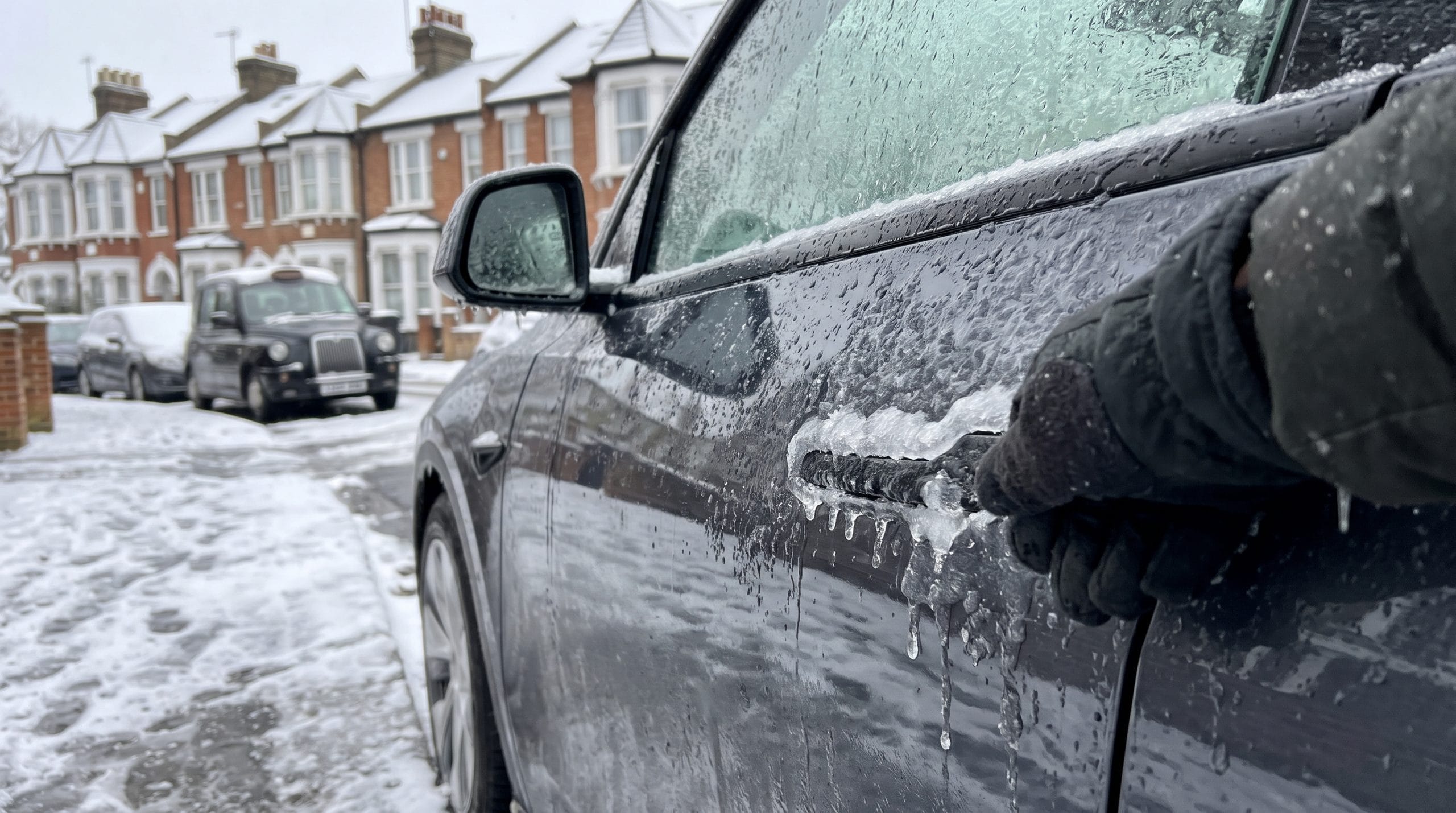
Ice inside a flush Tesla door handle can lock you out of a car that is otherwise unlocked, charged and ready to go. The handle sits tight against the door skin, so a thin layer of freezing rain is enough to glue it in place.
The safe fix for Tesla frozen door handles is to warm the car remotely, then press the handle by hand in the order Tesla specifies for your model, never using tools, hot water or excessive force. For the driver’s door, you can instead use Unlatch Door in the Tesla app once the glass is free of ice.
I own a 2019 Model 3 LR and a 2026 Model Y LR (Juniper) in the UK, where winters tend to bring frost and freezing drizzle more than deep North American cold. The advice below follows Tesla’s official procedures, and I flag where the model, handle colour, app version or market changes what you should do.
If you want more winter and ownership guides as they go live, the free TeslaStir newsletter is an easy way to get them in your inbox.
Key Takeaways
- Warm the car from the app first, and only then work on the handle.
- If the handle won’t move, use Unlatch Door in the Tesla app to release the driver’s door, but only once the glass is free of ice.
- Press the handle by hand in Tesla’s model-specific order, with no tools or hot water, and stop well short of denting the panel.
- Lubricate the pivot pins and dry the handles before a freeze to help stop it happening again.
Start Here: A Parked-Car Checklist for Getting Inside
Your first job is to work out what is frozen, then let the car do some of the warming before you touch anything. A frozen Tesla door handle, a window frozen to its seal and an iced-up door seal all feel the same from outside, but each needs a slightly different approach.
Check for Ice Around the Handle, Window and Door Seal
Walk round the car before pressing anything. Look for:
- A clear glaze over the handle. Freezing rain leaves a shiny shell that bridges the gap between handle and door.
- Ice along the top of the glass. Frameless doors drop the window slightly when you open them, and ice here can stop that movement.
- Frozen seals at the door edge. Snow that melted and refroze in the shut line holds the door closed even when the handle works.
Try a different door too, as one side of the car can be less iced than the other.
Start Defrost Car Without Forcing the Door
Open the Tesla app, go to Climate and use Defrost Car. This raises the cabin temperature and heats the glass, which helps loosen ice around the windows and, over time, the door area.
Tesla recommends starting climate at least 30 to 45 minutes before you plan to leave, so allow that long in hard frost. Use the time to clear loose snow off the roof and door tops with a soft brush, so meltwater does not run back into the handles. If the app reports an error when you try this, the fix for when a Tesla fails to turn on climate covers the usual causes.
Use Unlatch Door in the Tesla App (Where Supported)
The Tesla app has an Unlatch Door quick control for the driver’s door on the Model 3 and Model Y. It needs vehicle software 2022.36 or later, and it does not open the passenger or rear doors. If you do not see it, press and hold one of the quick controls in the app and add it from the list.
It releases the latch electrically so you can pull the door open by its edge, which gets you in without moving a frozen handle.
Let Defrost Car run first. These are frameless doors, so the window has to drop slightly as the door opens. If the glass is still frozen into the seal, opening the door can break it. The risk comes from the glass catching on the trim: one Model Y window shattered when a power fault stopped it dropping, and frozen glass that has not dropped can catch in the same way. If the door releases but the glass has not dropped, stop and allow more defrosting time.
How Do You Free the Handle Without Damaging It?
Tesla’s method relies on firm hand pressure in a set order, and the order depends on your handle. Black Model 3 handles and Model Y handles rock at the front first, while silver Model 3 handles need controlled bumps with the bottom of your fist.
Black Handles: Press the Front Before Operating the Rear
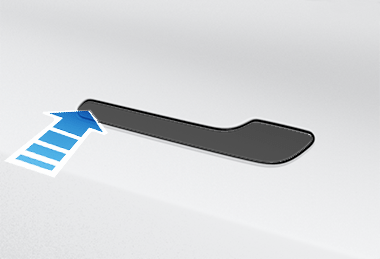
For a Model 3 with black handles, Tesla says to forcefully press the frontmost part of the handle so it rocks slightly inward and cracks the ice.
Then:
- Press the rear, wide part as you normally would.
- Once it moves, open and close it a few more times to clear the remaining ice.
- Make sure the handle is fully retracted before you get in.
The Model Y uses the same front-then-rear sequence, and Tesla lists one procedure for Model Y handles with no colour split.
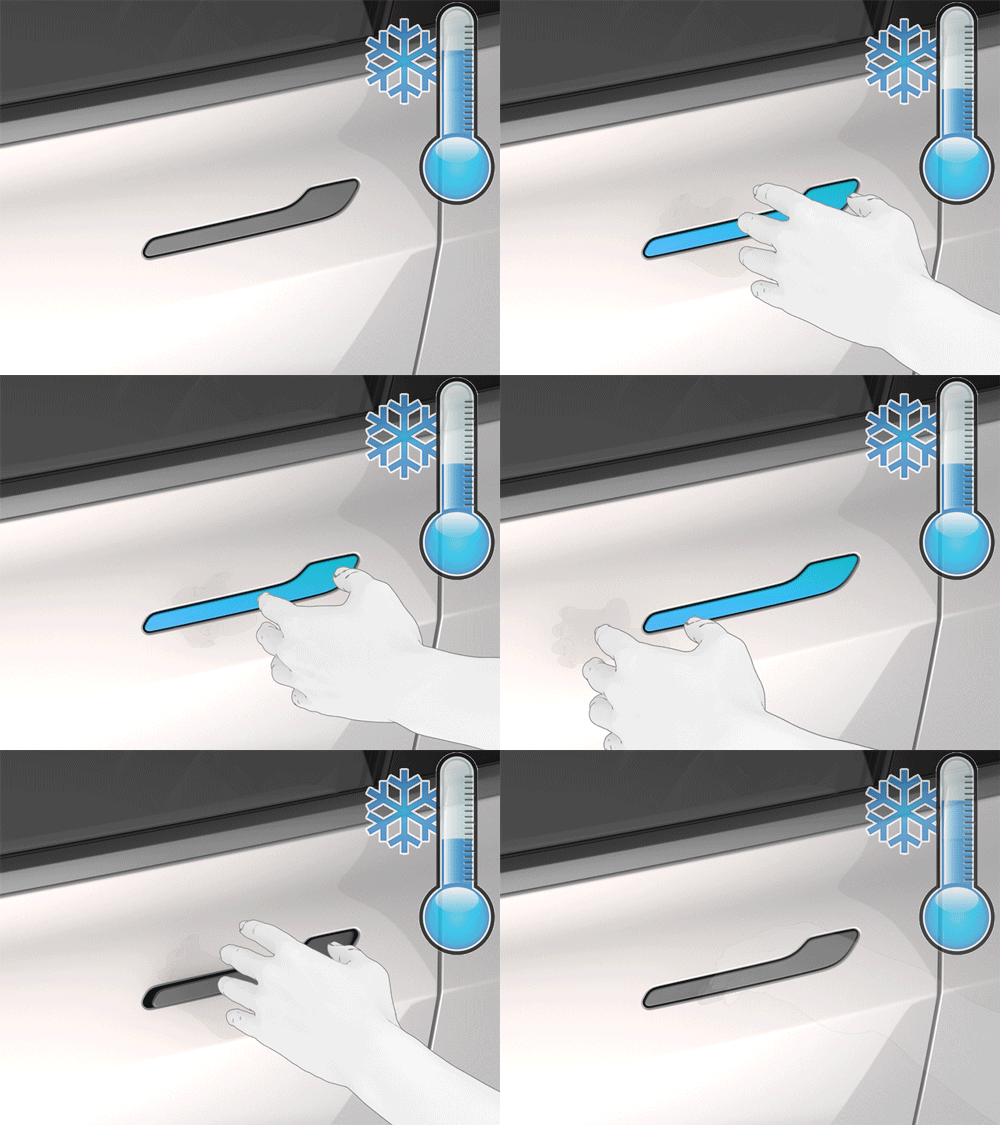
Silver Handles: Follow Tesla’s Controlled Bumping Procedure
Older silver Model 3 handles need a different touch. Take off rings or watches first so you do not scratch the paint.
- Press the rear of the handle to try to open it.
- Bump around the handle’s edge in a circle with the bottom of your fist.
- Aim further bumps at the rear end of the wide part, increasing the force gradually.
- Repeat until the handle opens, then cycle it a few times.
Tesla compares the right force to knocking on a neighbour’s front door. Anything that could dent the panel is too much.
Check the Instructions for Your Model Year and Handle Design
Handle colour and design changed across years and refreshes, so check yours before you start. A quick guide:
| Vehicle | Handle | First Press |
|---|---|---|
| Model 3, black handles | Black | Front, then rear |
| Model 3, silver handles | Silver | Rear, then fist bumps |
| Model Y (including 2026) | All | Front, then rear |
Model S and Model X use different handle mechanisms, so follow the manual for those cars.
Avoid Boiling Water, Tools and Excessive Force
Tesla warns against tools or excessive force on an iced handle. I would add boiling or hot water to that list. Hot water on cold glass risks cracking it, and the water refreezes in the handle cavity, often worse than before.
Leave scrapers, credit cards and keys out of the handle gap too. They chip paint and can bend the handle mechanism.
What if the Handle Moves but the Door Still Will Not Open?
A handle that pivots while the door stays shut usually points to a frozen seal or window. The latch has released, but ice is holding the door to the body.
Distinguish a Frozen Seal or Window From a Stuck Handle
Listen as you operate the handle. A click or a small release of pressure often suggests the latch opened. If you notice that and the door still holds, the seal or glass may be the problem.
If the handle will not pivot at all, go back to the pressing steps above. Pulling harder on a handle that is still frozen strains its mechanism.
Allow More Defrosting Time Before Opening or Closing the Door
Let Defrost Car run longer. The window needs to drop slightly as the door opens, and that only works once the glass is free of the seal. Do not force the door while the glass is frozen, as this can break it.
When closing, avoid slamming: Tesla states that slamming or forcing closures can cause damage not covered under warranty. Slamming a door when the glass has not dropped can also break the window.
Check Handle Retraction and Secure Door Closure Before Driving
Before you drive away, check two things:
- Every handle is flush. Tesla says to make sure each handle is fully pressed in before you get in.
- Every door is fully shut. The touchscreen shows a door open warning if one is not.
When Should You Contact Tesla Service or Roadside Assistance?
Book service if a handle stays stuck after the car is warm, does not retract, or makes grinding noises. If you cannot get in at all, Tesla Roadside Assistance is available 24/7, 365 days a year from the app.
Coverage and response options differ by country, so check what applies in your market before you need it.
How Can You Prevent Handles From Freezing Again?
Prevention comes down to keeping water out of the handle and keeping the car warm before you need it. A little preparation the evening before a freeze saves a lot of trouble the next morning.
Why Moisture Freezes Around Flush Door Handles
Flush door handles leave a narrow gap around their edge and a pivot inside. Rain, melting snow and car wash water creep into that gap. When the temperature falls overnight, the water freezes and locks the moving parts.
Freezing rain is the worst case, because it coats the whole handle in one hard shell.
Schedule Preconditioning and Stay Plugged in Where Practical
Set a preconditioning schedule or start climate from the app before you leave. Staying plugged into a Tesla Wall Connector or another home charger lets the car warm itself from the grid, keeping the battery for driving.
Follow Tesla’s Pivot-Pin Lubrication Guidance
Tesla suggests WD-40 on the pivot pins before freezing rain, heavy snow or ice.
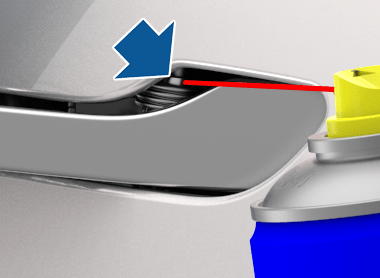
The steps are the same in Tesla’s Model 3 and Model Y guides:
- Prop the handle open with a folded towel.
- Wear eye protection and attach the straw.
- Spray the pivot pin for about one second, avoiding other parts.
- Remove the towel and pivot the handle about ten times.
- Repeat the spray and pivot steps, then do the other three handles.
Reapply as needed, and follow the WD-40 label instructions too.
Dry Handles and Seals After Washing and Before a Freeze
After a wash, open and close each handle a few times and wipe the gaps with a microfibre cloth. Dry the door seals and window tops as well.
Avoid washing late on a cold day. Water left in the handles has no time to dry before the overnight drop.
Free the Ice, Not the Handle by Force
A frozen door handle clears safely when you combine remote warming with Tesla’s pressing method for your exact car. Start Defrost Car, check for ice on the handle, glass and seals, and use the app’s Unlatch Door control for the driver’s door if you need it, once the glass is free.
Then match the method to your handle: front-then-rear for Model Y and black Model 3 handles, controlled fist bumps for silver ones. Skip hot water and tools.
Before the next cold snap, lubricate the pivot pins, dry the handles after washing and schedule preconditioning so the car is warm when you walk out.
Frequently Asked Questions
Do Tesla Model 3 and Model Y door handles freeze in winter?
Yes, both can freeze in freezing rain, heavy snow or icy conditions. Tesla publishes ice-removal steps for each model, which shows it is a known winter issue.
Can the Tesla app open every door when the handles are frozen?
No. Unlatch Door works on the driver’s door of the Model 3 and Model Y. Use it after defrosting, because frozen glass or a frozen seal can still hold the door. For the other doors, use Defrost Car and the manual pressing steps.
Does Defrost Car directly heat the door handles?
Defrost Car warms the cabin and glass, which helps ice around the door over time. Tesla’s handle procedure still relies on pressing, so treat the warmth as a helper.
What can I do if Unlatch Door is missing from my Tesla app?
Press and hold one of the quick controls in the app and check whether you can add it. It also needs vehicle software 2022.36 or later, so update the app and the car if needed. If it still does not appear, use Defrost Car and the manual pressing steps, or contact Tesla through the app.
Are frozen or damaged Tesla door handles covered under warranty?
A faulty handle mechanism is for Tesla Service to assess under your warranty terms. Tesla’s manual warns that slamming or forcing doors can cause damage the warranty does not cover, so avoid tools and heavy force.
